What Is a QR Code POS System
and How Does It Work?
More Malaysian restaurants are ditching bulky terminals and paper menus for a QR code on the table. Here's exactly what a QR code POS system is, how it works end-to-end, and whether it's right for your restaurant.
What Is a QR Code POS System?
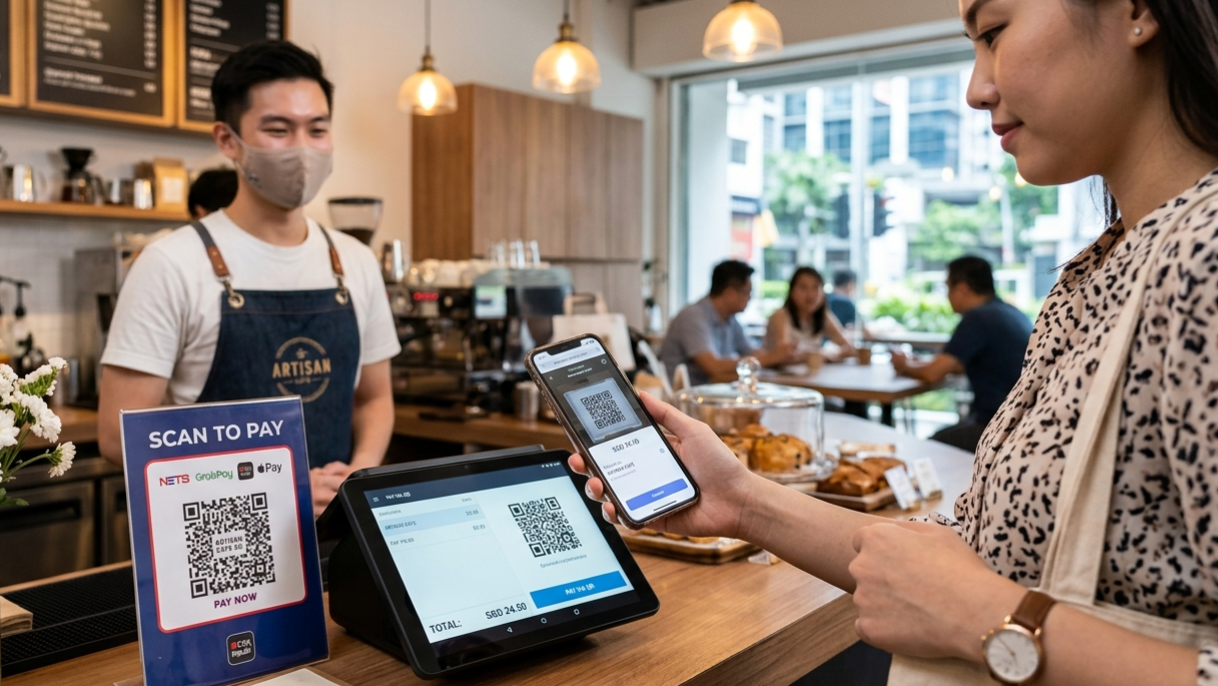
A QR code POS system is a point-of-sale setup where customers scan a QR code placed on their table to browse the menu, place orders, and sometimes pay — all from their own smartphone, without needing a physical menu or waiting for a staff member to take their order.
Unlike a traditional POS terminal that sits at a counter and requires a cashier, a QR code POS system shifts the ordering interface to the customer's phone. The kitchen and payment side still run through a centralised backend — it's just the front-end experience that changes dramatically.
Think of it as turning every table in your restaurant into its own self-service ordering counter, without replacing your staff or your kitchen workflow.
Quick definition: A QR code POS system combines a digital menu (accessible via QR scan), an order management dashboard, and optionally a payment gateway — all connected in real time so your kitchen receives orders the moment a customer taps "Place Order."
How Does a QR Code POS System Work? (Step by Step)
The process is simpler than most restaurant owners expect. Here's how it works from the moment a customer sits down to when the food hits the table:
Customer scans the QR code
A unique QR code is placed on each table — on a tent card, printed on the table itself, or on a sticker. The customer scans it with their phone camera. No app download is required; the digital menu opens instantly in the browser.
Customer browses and orders
The menu loads on their phone with categories, item photos, descriptions and prices. They tap items, choose add-ons or variations (e.g. spice level, size), and add to cart. When ready, they tap "Place Order."
Order goes straight to the kitchen
The order is sent in real time to your kitchen display screen (KDS) or printed on your kitchen printer. Your kitchen team sees the table number and full order instantly — no transcription errors from a rushed waiter.
Staff delivers the food
Your front-of-house team focuses on delivering orders and looking after guests rather than running back and forth taking orders. This is where the biggest service improvement shows up.
Customer pays (optional)
Depending on the system, customers can pay directly from their phone via e-wallet, card or online banking — or request the bill traditionally at the counter. Either workflow is supported.
Key Components of a QR Code POS System
A complete QR code POS system is made up of several interconnected parts working together:
- Digital menu engine — The web-based menu customers see on their phones, hosted in the cloud and updated in real time from your dashboard.
- QR code generator — Each table gets a unique QR code tied to a table number so orders are routed correctly.
- Order management dashboard — A web or tablet-based interface where your team monitors incoming orders, marks items ready, and manages table status.
- Kitchen display / printer integration — Orders route directly to the kitchen the moment they're placed, replacing verbal or handwritten tickets.
- Payment gateway (optional) — Integration with e-wallets like Touch 'n Go, GrabPay, or online banking for in-seat payment.
- Analytics & reporting — Sales data, popular items, peak hours and table turnover stats — all accessible from the dashboard.
QR Code POS vs Traditional POS: What's the Difference?
Both systems handle orders and sales — but the customer experience and operational model are very different.
| Feature | Traditional POS | QR Code POS |
|---|---|---|
| Order taken by | Waiter, then entered into terminal | Customer (self-order on phone) |
| Menu updates | Reprint physical menus | Real-time via dashboard |
| Order errors | Common (miscommunication) | Rare (customer inputs directly) |
| Hardware needed | Terminal, cash drawer, printer | QR sticker + tablet/PC dashboard |
| Staff required | More order-takers needed | Fewer, focused on service |
| Upsell capability | Depends on staff | Automatic (add-ons, photos) |
| Setup cost | RM 3,000–RM 15,000+ | Typically RM 0–RM 500/month |
Benefits for Malaysian Restaurant Owners
Beyond the obvious convenience, a QR code POS system delivers measurable operational gains — especially in the Malaysian F&B context where labour costs are rising and customer expectations are shifting:
- Reduced ordering errors — Customers input their own orders, eliminating miscommunication between diners and staff, especially in noisy environments.
- Faster table turnover — No waiting for a waiter to arrive and take orders. Customers order as soon as they're ready, cutting idle time per table.
- Lower staff dependency — With fewer order-takers needed, a lean team can manage more tables without sacrificing service quality.
- Instant menu updates — Sold out of nasi lemak? Mark it unavailable in 10 seconds from your phone. No reprinting needed.
- Built-in upselling — Digital menus can show recommended add-ons, bundle suggestions and item photos, which consistently increases average order value.
- Real-time sales data — See which dishes sell best, at what time, and on which days — without waiting for end-of-day tallies.
Malaysian context: With the minimum wage increase in 2025 and ongoing challenges hiring service staff, more F&B operators in the Klang Valley, Penang and Johor Bahru are adopting QR ordering as a direct cost-reduction strategy — not just a tech upgrade.
Is a QR Code POS System Right for Your Restaurant?
A QR code POS system works best for:
- Cafés, casual dining and quick-service restaurants with moderate to high table count
- Restaurants with a young, smartphone-comfortable customer base
- F&B operators struggling with staff turnover or recruitment
- Restaurants that change their menus frequently (seasonal specials, daily items)
- Multi-outlet restaurants that want a consistent ordering experience across locations
It may be less suited for fine dining establishments where personal table service is a core part of the brand experience — though even there, QR menus for browsing (without full self-ordering) are becoming common.
How ROVA's QR Ordering System Works
ROVA's QR ordering system is built specifically for Malaysian restaurants. Customers scan, browse and order from a fast-loading mobile menu — no app download, no sign-up required. Orders hit your kitchen display or printer in seconds. You manage your menu, items, and availability from a clean web dashboard, from any device.
The system is designed to be live within a day of setup, with no hardware to purchase beyond the QR sticker for each table. Learn more about ROVA's food ordering system →
Frequently Asked Questions
A QR code POS system is a point-of-sale setup where customers scan a QR code at their table to browse the menu, place orders, and sometimes pay — all from their own smartphone, without needing a physical menu or waiting for staff to take their order.
No. With most modern QR code POS systems like ROVA, customers simply scan the QR code with their phone's camera and the menu opens instantly in the browser — no app download required. This removes a major friction point for first-time users.
Yes. QR code POS systems are especially beneficial for small and medium restaurants in Malaysia because they reduce the need for extra wait staff, lower printing costs for menus, and allow real-time menu updates without reprinting costs.
Cloud-based QR ordering systems require an internet connection to sync orders to the kitchen in real time. However, a stable WiFi or broadband connection (which most Malaysian restaurants already have) is sufficient — you don't need specialised networking.
Yes. Most QR code POS systems — including ROVA — allow staff to place orders manually through the dashboard on behalf of a customer. This is useful for older customers who are less comfortable with smartphones, or for walk-up counter orders.
Ready to modernise your restaurant?
ROVA's QR ordering system is built for Malaysian restaurants — easy setup, no app required, live in a day.
Get Started Free