How to Handle Customers Who Don't Know How to Use QR Ordering
QR code ordering speeds up service for most diners — but for some, it's the reason they almost walked out. Here's how to keep the speed without losing the customer.
ROVA Team
Updated June 2026
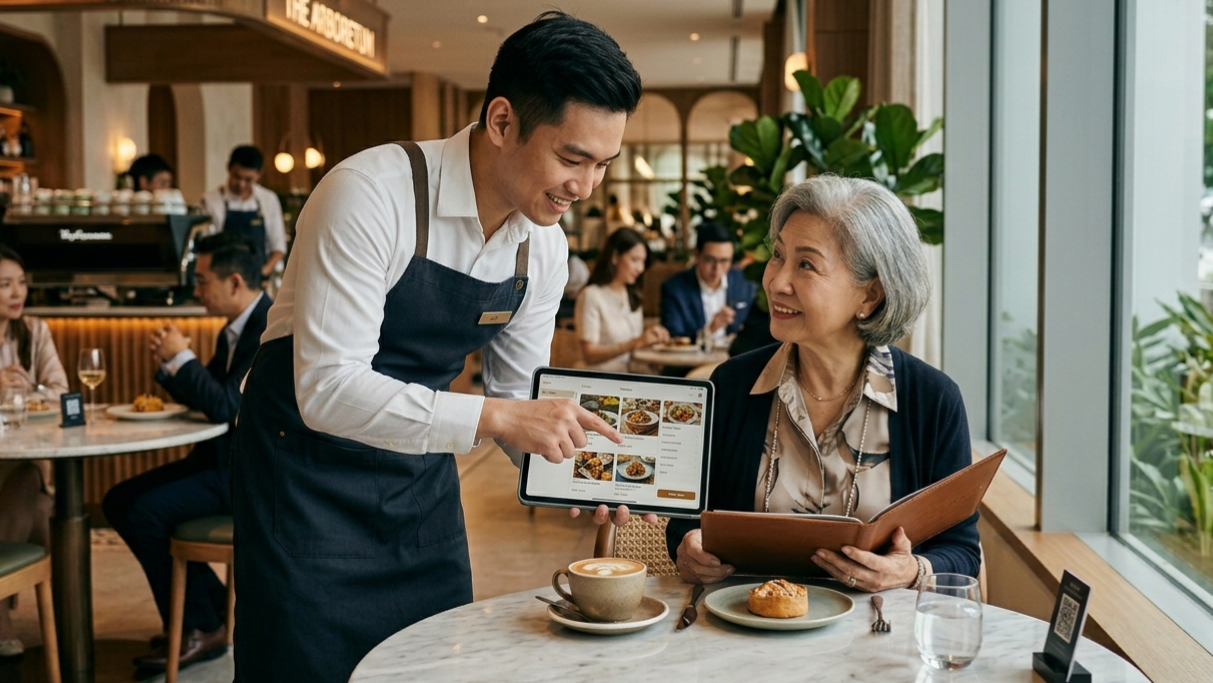
Picture a regular Tuesday lunch rush. A table of four is seated, the QR code sticker is right there on the table tent, and three of them have already scanned, browsed, and started picking dishes. The fourth person — let's say it's someone's grandmother — is still holding the table tent upside down, squinting at a code that, to her, looks like static.
This scene plays out in restaurants every single day, and it's becoming one of the most common friction points in QR code ordering. Elderly customers aren't reluctant to try new things out of stubbornness. They're running into a genuine usability gap — small text, unfamiliar gestures, slow connections, and an interface that assumes everyone already knows what a QR code is and how to scan one.
The good news: this isn't a reason to abandon QR ordering. It's a reason to design around it properly. Below is a practical breakdown of why elderly customers struggle with QR ordering, and exactly what restaurants can do to fix it — without slowing down the rest of the room.
Why QR Code Ordering Trips Up Older Customers
It helps to understand the actual friction points before trying to solve them. The problems usually aren't about intelligence or willingness — they're about ergonomics and familiarity.
- Smaller text and tiny tap targets. Digital menus optimized for younger eyes often use compact fonts and closely spaced buttons that are hard to read or tap accurately.
- Unfamiliar camera gestures. Not every older customer scans QR codes daily. Opening the camera app, framing the code, and waiting for the link to pop up is a multi-step process that isn't intuitive if you've never done it.
- Vision and dexterity challenges. Presbyopia, reduced contrast sensitivity, and less precise finger control all make small on-screen elements harder to use.
- Trust and security concerns. Some older diners are simply wary of scanning unknown codes or entering payment details on their personal phone in a public setting.
- No backup option offered. The biggest issue isn't the QR code itself — it's when staff don't realize a customer is struggling until they're already frustrated, because there's no obvious "ask for help" signal.
The goal isn't to make QR ordering harder to avoid. It's to make the "I need help" path just as smooth as the "I've got this" path.
1. Train Staff to Spot the Signs Early
Most negative QR ordering experiences escalate because nobody intervenes early enough. Staff should be trained to recognize the early signals — a customer staring at the table tent for more than 20–30 seconds, turning their phone in different directions, or quietly asking a tablemate for help — and step in before frustration sets in.
- Do a quick visual sweep of new tables within the first two minutes of seating, not just at order time.
- Approach with a simple, low-pressure line: "Would you like me to walk you through the menu, or would you prefer I take your order directly?"
- Never make the customer feel singled out. Frame it as a normal option available to everyone, not a special accommodation.
2. Always Offer a Non-Digital Path
The single most effective fix is the simplest one: never make QR ordering the only way to order. A laminated printed menu at the table, or a staff member ready to take a verbal order, removes the pressure entirely. Customers who can use the QR code will keep using it because it's faster. Customers who can't will quietly default to the paper menu without ever feeling like they failed at something.
This hybrid approach is also why most well-designed QR ordering systems are built to support staff-assisted ordering on the backend — so a server can place the order on the customer's behalf using the same digital menu, kitchen routing, and payment flow, just without requiring the customer to touch a phone at all.
3. Make the Table Tent Do More of the Work
A lot of QR ordering friction comes down to bad signage, not bad technology. A few small design changes go a long way:
- Print the QR code large enough to scan from a normal seated distance without leaning in.
- Add a short, numbered instruction underneath: "1. Open Camera 2. Point at code 3. Tap the link that appears."
- Include a line that explicitly invites help: "Need a hand? Just wave us over."
- Use high contrast — dark text on a light background reads better for low-vision customers than colored or low-contrast designs.
4. Choose a QR Menu That's Actually Built for Easy Reading
Not all QR ordering platforms are equal, and the menu interface itself matters as much as the code. When evaluating or building a digital menu, look for:
- Large, legible fonts with generous spacing between menu items and buttons.
- Big, obvious "Add to Cart" and "Call Waiter" buttons rather than small icons.
- A visible "Need Help" or "Call Staff" button on every screen, not buried in a menu.
- Minimal steps between opening the link and placing an order — fewer taps means fewer chances to get stuck.
- Fast loading on weaker restaurant Wi-Fi, since a slow page is often mistaken for a broken code.
A "Call Staff" button built directly into the digital menu is particularly effective, because it lets a customer ask for help without saying a word or looking around for a server — the request goes straight to staff devices.
5. Keep a Few Phones or Tablets on Standby
For restaurants that want to stay fully digital while still being accommodating, keeping one or two house tablets pre-loaded with the menu solves a lot of friction. A staff member can hand over a device already on the ordering page, point to the first item, and let the customer tap through with guidance — no camera scanning required at all.
6. Don't Forget the Payment Step
Even customers who manage to browse and order successfully can stall at checkout if it requires entering card details unassisted. Offering "pay at counter," "pay by cash," or "let staff process payment" options alongside self-checkout keeps the experience flexible for everyone, not just tech-comfortable diners.
The Bigger Picture
QR code ordering isn't going away — it's faster for staff, reduces order errors, and most customers genuinely prefer it once they're used to it. The mistake is treating it as an all-or-nothing system. The restaurants that get the best results are the ones that treat QR ordering as the default fast lane, while keeping a clearly signposted, judgment-free slow lane for anyone who needs it — staff included.
Handled well, an elderly customer who needed help with the QR code on their first visit often becomes someone who confidently scans it themselves on their third — simply because nobody made them feel rushed or out of place the first time.
Want a QR ordering system built for every kind of customer?
ROVA's food ordering platform includes staff-assisted ordering, large-format menus, and built-in call-staff buttons.