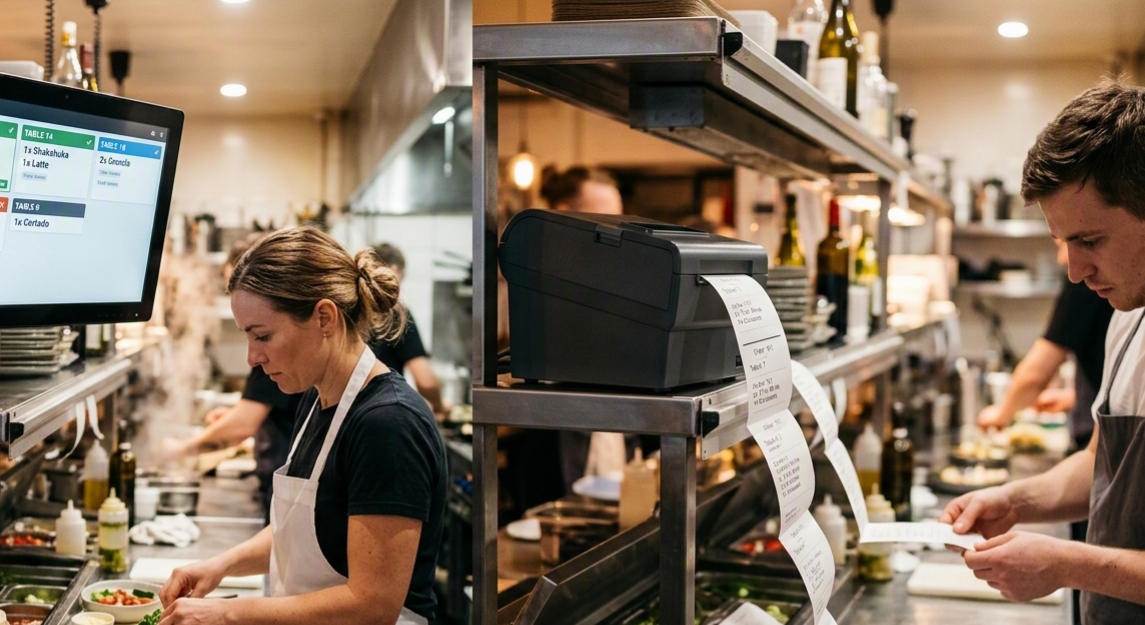
If you've ever stood at a pass during a Friday-night rush, you already know the stakes. A kitchen printer has been the default for decades: cheap, familiar, and dumb in the way a hammer is dumb — it does one thing and does it reliably. A kitchen display system (KDS) is the newer, screen-based alternative that turns every incoming order into a digital ticket the whole line can see, sort, and time.
Neither one is "better" in the abstract. The right choice depends on your order volume, how many stations you run, and whether your orders are coming from one channel or five. This guide breaks down exactly where each system wins, so you can match the tool to your kitchen instead of the other way around.
What Is a Kitchen Printer?
A kitchen printer (often called a KOT printer, short for kitchen order ticket) is a thermal printer connected to your POS or ordering system. The moment an order is placed, it prints a paper slip at the relevant station — grill, fry, salad, expo. Line cooks read the slip, cook the item, and either clip it to a rail or toss it once the dish goes out.
It's the system most restaurants grew up on, and for a reason: it's tactile, it needs almost no training, and it keeps working even when the internet doesn't.
What Is a Kitchen Display System?
A KDS replaces the printer with a screen — usually a rugged, heat-resistant monitor mounted above each station. Orders appear as digital cards instead of paper slips, and cooks tap, swipe, or use a bump bar to mark items as fired, in progress, or complete. Because it's connected to the same backend as your POS and online ordering, a KDS can automatically sort tickets by course, color-code late orders, and sync timing across every station at once.
For restaurants running QR code ordering alongside delivery apps and walk-in POS, a KDS is often the only way to keep all three order streams organized without a printer graveyard behind the pass.
Kitchen Display System vs Printer: Head-to-Head
| Factor | Kitchen Printer | Kitchen Display System |
|---|---|---|
| Upfront cost | Low (RM50–RM1,250+ per unit) | Higher (RM350–RM6,000+ per screen) |
| Ongoing cost | Paper rolls, ribbon, printer servicing | None per order, occasional software fee |
| Order accuracy | Faded ink, lost/misplaced slips | Digital, always legible, hard to lose |
| Speed & timing | No automatic timers | Built-in timers, color-coded delays |
| Multi-station sync | Manual — cooks call out verbally | Automatic — all stations see the same ticket |
| Multi-channel orders | Struggles past 2–3 channels | Handles POS, QR, delivery apps in one view |
| Environmental impact | Constant paper waste | Paperless |
| Works offline | Yes, always | Depends on setup; needs backup plan |
| Data & reporting | None | Ticket times, bottleneck reports, analytics |
| Best for | Small, single-station kitchens | Multi-station, multi-channel, high-volume kitchens |
Kitchen Printers: Where They Still Win
Advantages
- Low cost of entry. A printer and thermal rolls are cheap enough for a single-station food stall or small café to justify on day one.
- Zero learning curve. Anyone who can read can use a paper ticket — no training, no login, no interface to learn.
- Offline resilience. A printer connected to a local network keeps working through an internet outage, which matters if your connection isn't rock solid.
- Physical tracking. Some cooks genuinely prefer clipping a slip to a rail; it's a tactile way to see what's still outstanding.
Disadvantages
- Paper jams, faded thermal ink, and lost slips are a daily nuisance during rushes.
- No built-in timing, so tickets sitting too long only get noticed if someone's watching.
- Coordinating multiple stations on the same order relies entirely on cooks calling out to each other.
- Every online order, QR order, and delivery ticket adds another printer — and another point of failure.
- Continuous paper and ribbon costs add up, and none of it is recyclable once it's covered in kitchen grease.
Kitchen Display Systems: Where They Pull Ahead
Advantages
- Everyone sees the same ticket. When an order needs input from three stations, all three see it update in real time, instead of relying on a runner or a shout.
- Built-in timing and alerts. Tickets change color as they age, so a forgotten order is visible before a guest complains — not after.
- One screen for every channel. Dine-in, QR table ordering, and third-party delivery orders all land in the same queue instead of on three separate printers.
- Real data. Average ticket time, station bottlenecks, and peak-hour load become numbers you can actually act on, not guesses.
- No paper, no waste. Nothing to restock, jam, or run out of mid-rush.
Disadvantages
- Higher upfront hardware cost, especially across several stations.
- Requires a stable connection and a bit of setup; an outage without a fallback plan can stall the whole kitchen.
- Cooks used to paper need a short adjustment period to trust a screen over a physical slip.
- Screens need occasional cleaning and maintenance in a hot, greasy environment.
So Which One Should You Choose?
Rather than picking a side, match the system to the kitchen you actually run:
- Food trucks & single-station stalls: A printer is usually enough. Low volume, one cook, one line — there's little a KDS would add.
- Quick-service & cafés with 2–3 stations: This is the tipping point. If tickets regularly need input from more than one station, a KDS starts paying for itself in fewer missed items.
- Full-service restaurants: A KDS keeps courses timed and stations synced, which matters more as menus and covers grow.
- Cloud kitchens & multi-channel operations: If orders are arriving from a POS, a QR ordering system, and two or three delivery apps at once, a KDS is close to essential — a printer setup for that many channels becomes its own bottleneck.
- High-volume, high-growth restaurants: The reporting a KDS provides — ticket times, slow stations, peak-hour patterns — becomes a genuine operational tool, not just a nice-to-have.
Many kitchens don't have to choose all at once. It's common to start with printers at one or two stations and add a KDS as order volume or channel count grows, especially once online and QR ordering start driving a meaningful share of covers.
Frequently Asked Questions
Can I use a KDS and a kitchen printer together?
Yes. Many kitchens run a hybrid setup — a KDS for the main line and a printer for expo or a station that only needs a quick physical checklist.
Does a KDS work with QR code ordering?
It should. A KDS connected to your ordering platform receives QR table orders the same way it receives POS orders, which is exactly why multi-channel kitchens tend to move to a KDS first.
What happens to a KDS if the internet goes down?
It depends on the setup. Look for a system with local network fallback or an offline mode, and always keep a backup printer for true worst-case scenarios.
Is a kitchen display system worth it for a small restaurant?
If you're running one or two stations at moderate volume, probably not yet. It becomes worth it once you're juggling multiple order channels or multiple stations that need to stay in sync.
The Bottom Line
A kitchen printer is a reliable, low-cost tool for simple, single-channel kitchens. A kitchen display system is an operational upgrade for anywhere orders are coming from more than one direction or need more than one station to complete. The busier and more multi-channel your kitchen gets, the more a KDS pays for itself in fewer errors, faster tickets, and data you can actually use to run the place better.
Bringing QR ordering into your kitchen?
See how ROVA connects QR table ordering directly to your kitchen workflow — no matter which system you run.
Talk to ROVA