How Hawker Stalls Can Go Cashless With a Simple QR Ordering System
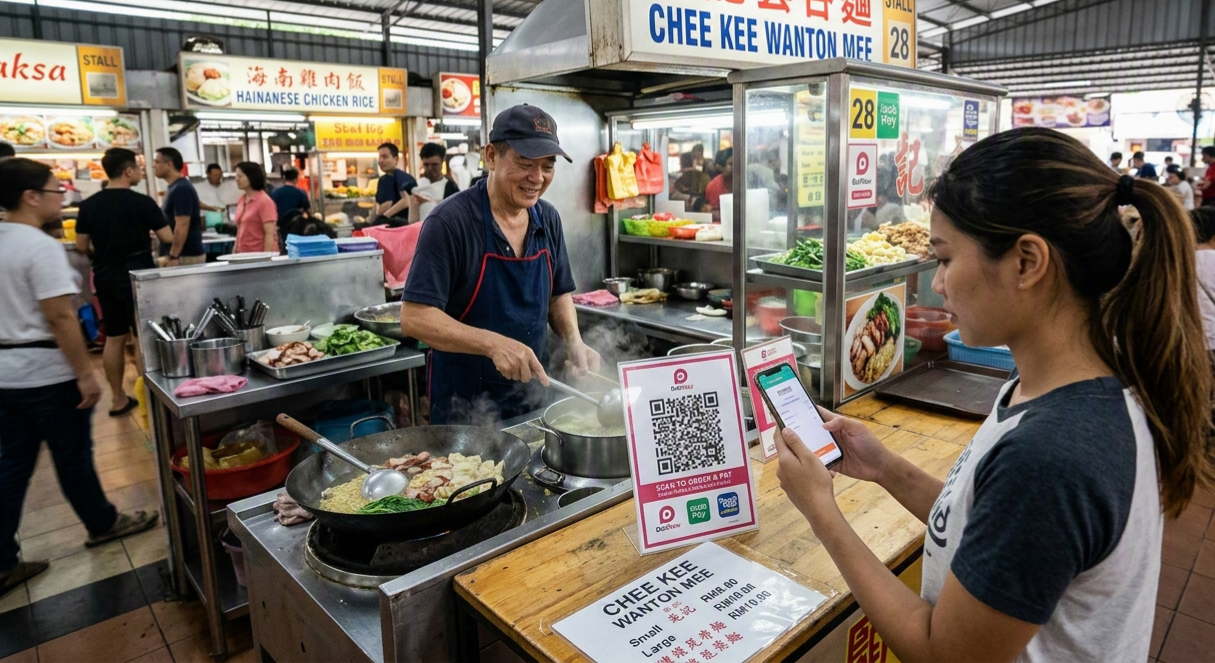
Walk through any hawker centre in Klang Valley, Penang, or Johor Bahru today and you'll see the same shift happening at almost every stall: a laminated DuitNow QR code taped to the counter, sitting next to a handwritten price list. Cash isn't going away, but more customers now expect to pay — and increasingly, order — without touching notes and coins at all. The good news for stall owners is that going cashless no longer means expensive terminals or a queue of tablets you don't have counter space for. A simple QR ordering system can get you there with a single printed code and a phone you likely already own.
Here's what that setup actually looks like, why it works well for hawker-style stalls specifically, and how to roll it out without confusing your regulars.
Why hawker stalls need a different approach
Most POS and ordering systems are built with a full restaurant in mind: multiple staff, table numbers, a kitchen printer, a host stand. A hawker stall usually has one or two people running everything — cooking, taking orders, and handling payment at the same time. Any system that adds steps, requires a dedicated device, or needs a data plan beyond what a phone hotspot can handle simply won't survive a lunch rush. The systems that actually get adopted at hawker stalls share three traits: they run on a phone you already own, they don't need a POS terminal, and they let you keep collecting cash from customers who still prefer it.
How a simple QR ordering system works
The mechanics are straightforward, which is exactly the point.
- You print one QR code. It links to your digital menu, hosted online — no app download required for the customer.
- The customer scans it with their phone camera. Malaysian shoppers are already used to this from DuitNow and store-front menus, so there's no behavior to teach.
- They browse and order directly from their phone. Photos, prices, and add-ons (extra chili, no onions, larger portion) are all visible upfront, cutting down on back-and-forth shouting over the counter.
- Payment happens in the same flow. DuitNow, Touch 'n Go eWallet, GrabPay, or card — whichever your customers use — with the option to still pay cash on collection if you allow it.
- Your phone receives the order. No separate kitchen display or printer is required; a notification with the order details is enough for a one- or two-person stall.
What this actually changes for a stall owner
- Shorter queues at peak hours. Customers order and pay while still in line, instead of ordering, waiting to pay, and waiting again for food — three interactions collapse into one.
- Fewer mistakes and disputes. Orders come through exactly as typed, removing the "I said no spice" arguments that come from a noisy, shouted order.
- Less cash handling. Fewer trips to the bank, less risk of short-changing during a rush, and less cash sitting in a drawer at a busy hawker centre.
- A running record of sales. Even a simple digital order log gives you a rough daily sales picture — something handwritten dockets never provided.
- Lower barrier for tourists and younger customers. Visitors unfamiliar with your dialect or menu shorthand can browse at their own pace instead of guessing what to order verbally.
Addressing the concerns stall owners actually have
"My regulars won't want to use their phone."
They don't have to. A QR ordering system works best as an option, not a replacement. Keep taking verbal orders and cash exactly as before — the QR code simply gives customers who prefer it a faster lane, especially during peak hours when queues form.
"What if the internet is patchy at my stall?"
This is a fair concern at some hawker centres. Look for a system that works on mobile data rather than relying on stall Wi-Fi, and confirm it queues orders gracefully if a connection briefly drops, rather than losing them entirely.
"I don't want to pay a percentage on every cash sale."
Cash orders taken the traditional way shouldn't incur any transaction fee — the fee structure of most QR ordering tools only applies to the digital payment methods processed through them, the same way an e-wallet or card terminal would.
Getting started this week
- Photograph your menu items. Simple phone photos in good lighting are enough — customers order more confidently when they can see what they're getting.
- List prices and common add-ons clearly. Note anything with a variable price (portion size, extra toppings) so there's no confusion at checkout.
- Print the QR code large enough to scan easily. A0-size counters need a code roughly postcard-sized, visible from where customers queue.
- Tell regulars it's optional. A short "scan to order, or just tell us!" sign avoids making anyone feel forced into it.
- Watch your first week of orders. Adjust item names or descriptions that customers seem to misunderstand.
Final thoughts
Going cashless doesn't have to mean an expensive overhaul of how a hawker stall runs. The stalls making the switch successfully are the ones treating QR ordering as an addition to their existing routine, not a replacement for it — something that speeds up the queue during a rush and gives customers who want it a faster, clearer way to order and pay, while cash stays on the table for everyone else.
Thinking about QR ordering for your stall? ROVA's food ordering system is built for hawker and small F&B setups — no terminal, no app download for customers, just a QR code and your phone. Talk to our team to see how it fits your stall.